In short
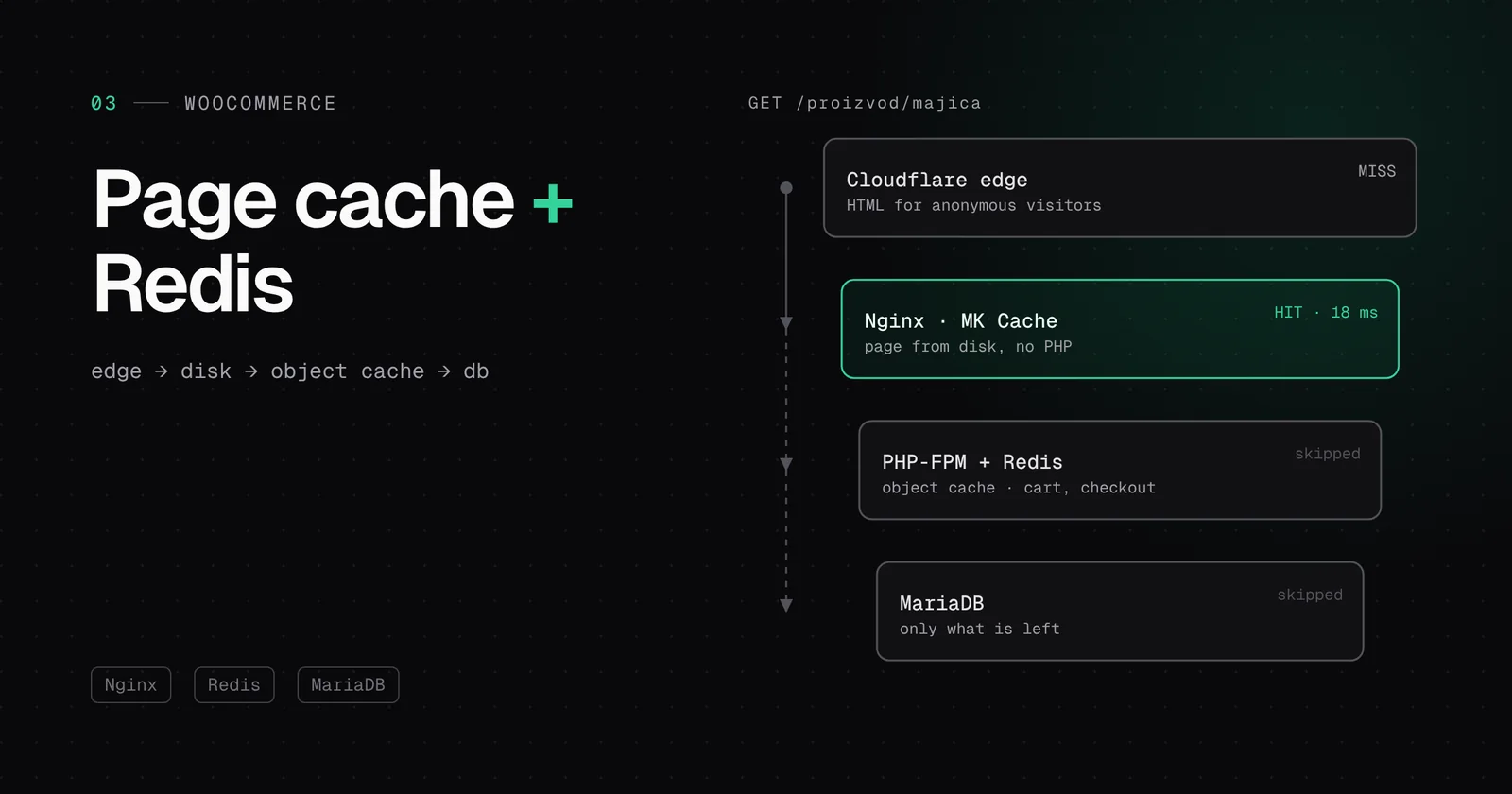
- The first layer is Cloudflare and Nginx: an anonymous visitor gets ready HTML from disk or from the edge, without PHP.
- The cart, checkout, account and anyone with a cart cookie take the long way, because their pages are personal.
- The second layer is Redis: it keeps query results between requests, so dynamic pages do not wait for the database.
- Since WooCommerce 7.8 the cart fragments script no longer loads everywhere. When moving a shop we check the theme does not bring it back.
What happens without caching
Every request for a WordPress page takes the same path: Nginx hands the request to PHP-FPM, PHP loads the WordPress core, the theme and all plugins, runs database queries, builds the HTML and returns it. For a blog that is a few dozen to a few hundred milliseconds. For WooCommerce with thirty plugins it can easily be a second, and more under load, because requests start queueing for a free PHP process.
The key idea of caching is simple: most shop visitors are not logged in and have nothing in the cart. For them the product page is the same. There is no reason for PHP to rebuild it for each of them.
Layer one: ready HTML from disk or from the edge
MK Cache is our own plugin. When PHP builds a public page for the first time, MK Cache saves the finished HTML to disk. Next time Nginx finds that file and sends it directly, without starting PHP. Nginx is exceptionally good at this: sending a file from an NVMe disk takes a fraction of a millisecond.
set $cache_file /wp-content/cache/mk-cache/all${uri}index.html;
try_files $cache_file $uri $uri/ /index.php?$args;
Above that sits Cloudflare, which can keep a copy of the HTML for anonymous visits at the edge, in the data centre closest to the visitor. Such a request does not even reach our server.
What a shop must not cache
The most dangerous caching mistake in a web shop is serving someone else’s cart. That is why MK Cache checks a list of conditions before saving. If any of them is true, the page takes the long way, straight to PHP:
| Condition | Why |
|---|---|
| Logged-in user or wp-admin | The page contains the toolbar and personal data |
| Cart, checkout, customer account | The content is unique to the customer |
| Cookie woocommerce_items_in_cart, woocommerce_cart_hash or woocommerce_session_ | The customer has something in the cart, so even a product page shows their cart |
| Comment author cookie | The comment form is prefilled |
| A query string in the URL | Filters, search and sorting |
| POST requests, feeds and 404s | They are not pages to store |
One exception is deliberate: tracking parameters such as utm_source, gclid and fbclid do not break the cache. Without that, every ad click would be a “new” URL and end up on PHP, exactly when a campaign brings the most people.
Cart fragments: the silent cache killer
For years WooCommerce loaded the cart-fragments.js script on every page. After the page loads, it sends an AJAX request (wc-ajax=get_refreshed_fragments) to refresh the mini cart in the header. The problem: that request always goes to PHP, for every visitor and on every page, so it cancels much of the benefit of the page cache.
WooCommerce 7.8 (June 2023) changed that. The script now loads only when the cart widget is on the page, and the new Mini-Cart block does not use cart fragments at all. But many classic themes have the widget hard-coded in the header, so the old pattern comes back. When we move a shop to our platform we therefore look at the network traffic: if we see get_refreshed_fragments on every page, we suggest the Mini-Cart block or limiting the script to shop pages.
Layer two: the Redis object cache
What about the cart, checkout and wp-admin, which cannot go into the page cache? That is where the object cache helps. WordPress already has a built-in object cache, but it lives only for the duration of one request. At the end of the request everything is forgotten and the next request asks the database again for the same options, settings and products.
A persistent object cache stores those results in Redis, an in-memory database, so the next request gets them in a fraction of a millisecond. Since version 6.1, WordPress itself recommends a persistent object cache in Site Health when a site does not have one. On our platform that is MK OB Cache: a minimal drop-in that uses only the phpredis PHP extension, with no extra libraries.
A bug we had to fix
All sites on a server share Redis, so each site needs its own key prefix. A popular way is to derive the prefix from the path to WordPress. But on our platform every site runs in its own chroot, and from the inside the path is the same for all of them: /web. The result would be two sites reading each other’s options from Redis.
MK OB Cache therefore builds the prefix from the database name, which is unique per site and available to both PHP-FPM and WP-CLI. It explicitly refuses the /web path as a prefix source. It is a detail you do not see until it goes wrong, and then it is very visible.
Which layer answers which request
| Request | Who answers | PHP? |
|---|---|---|
| Anonymous product view, cached at the edge | Cloudflare | No |
| Anonymous product view, first time at this edge | Nginx from disk (MK Cache) | No |
| Ad click (?utm_source=…) | Nginx from disk | No |
| Customer with a full cart views a product | PHP with Redis | Yes, fast |
| Checkout | PHP with Redis | Yes, fast |
| Editor in wp-admin | PHP with Redis | Yes, fast |
See what it does: two toolbar items
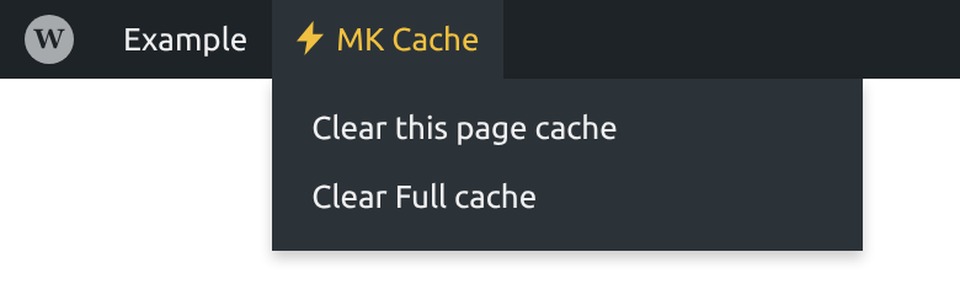
MK Cache is the gold toolbar item and MK OB Cache the green one (red if Redis is down). Clearing one does not clear the other, so you know exactly what you are clearing. Publishing or editing content refreshes the affected pages by itself, so manual clearing is rarely needed.
In short
- Cloudflare and Nginx serve ready HTML to anonymous visits, without PHP.
- Personal pages take the long way, and the rules are the same on every site.
- Redis relieves the database for everything that has to be dynamic.
- All of it comes included in all three plans, with no plugins to install.