In short
- Object storage is not a disk with folders but a store of keyed objects, reachable over HTTPS.
- Media leaves the server: smaller backups, faster migrations, PHP no longer serves images.
- Backblaze B2 costs USD 6.95 per TB per month, and traffic through Cloudflare is free.
- The key lesson: object storage has no rename, so the plugin must make sure file names are never reused.
A disk with folders versus a store of objects
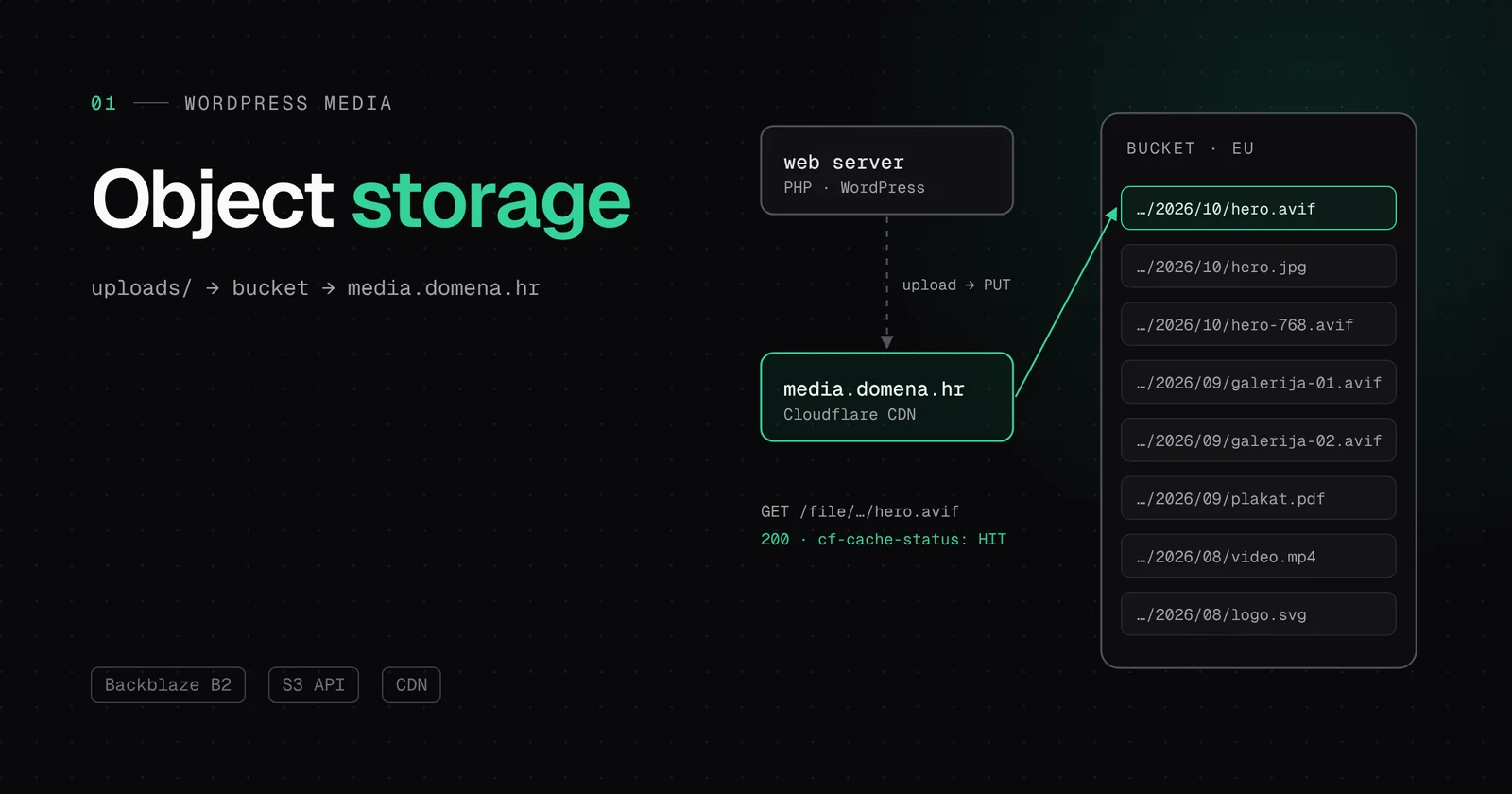
A server disk is a file system: folders, subfolders, permissions, renaming, appending to the end of a file. Object storage keeps only what matters. There is a bucket, and inside it objects. Each object has a key, its content and a few pieces of metadata such as the file type and caching rules.
The key looks like a path (wp-content/uploads/2026/10/image.jpg), but folders do not really exist. It is just a long name. You work with objects over HTTP: PUT stores, GET reads, DELETE removes. That set of commands is called the S3 API, after the Amazon service that made it famous, and today almost every provider speaks it, including Backblaze B2 and Cloudflare R2.
PUT /wp-content/uploads/2026/10/slika.avif
Content-Type: image/avif
Cache-Control: public, max-age=31536000
What object storage does not have is just as important. There is no rename, no append and no file locking. To change a name you copy the object under a new key and delete the old one. At first glance that is a limitation, but it is actually why object storage is cheap, almost infinitely scalable and simple to serve.
Why not just a bigger disk?
The question we get most often. A disk can be enlarged, but media on the disk creates three problems that a bigger disk does not solve:
- Backups. Every image goes into every backup. With a library of hundreds of thousands of files, backups take longer, restores take longer, and integrity checks become a job of their own.
- Migrations. Moving a site with 50 GB of images to a new server takes hours. Without the images the same move takes minutes, because only the code and the database move.
- Serving. Every image from the main domain goes through the web server. Nginx does it quickly, but those are still connections, memory and disk that should serve pages.
- files on one portal
- ~480,000files on one portal
- files moved with zero differences
- 60,385files moved with zero differences
- hours of downtime
- 0hours of downtime
What the two addresses look like
A classic WordPress image comes from the main domain and the main server:
https://vasadomena.hr/wp-content/uploads/2026/10/slika.jpgThe same image from object storage comes from a dedicated subdomain:
https://media.vasadomena.hr/file/vasadomena-hr-media/wp-content/uploads/2026/10/slika.jpg- media.vasadomena.hr is the subdomain that points to the bucket through the Cloudflare CDN.
- /file/vasadomena-hr-media is the bucket name in Backblaze B2.
- /wp-content/uploads/2026/10/slika.jpg is the key, the same path WordPress already knows, so nothing changes in the media library.
A real example from one of our sites:
https://media.yonijumpsuit.com/file/yonijumpsuit-com-media/wp-content/uploads/2022/06/cropped-YONI-2.pngWhy Backblaze B2 and not something else
We tried several options, and we even moved two sites from Cloudflare R2 to B2. The decision comes down to three numbers: the price of storage, the price of traffic and where the data lives.
| Backblaze B2 | Cloudflare R2 | |
|---|---|---|
| Storage | USD 6.95 per TB per month | USD 15 per TB per month (USD 0.015 per GB) |
| Traffic to visitors | Free through Cloudflare | Free |
| Read and write API calls | Free | Billed per million |
| Region | EU Central | Automatic or EU jurisdiction |
R2 is an excellent product and has no traffic fee at all. But B2 has free traffic to partner CDNs, Cloudflare among them, so when we serve images through Cloudflare that R2 advantage disappears. What remains is the storage price: for a large library B2 costs roughly half as much. For a portal with a few hundred gigabytes, that is a difference the client feels over the years.
What our plugin does behind the scenes
- When you upload an image, WordPress creates all the sizes. The plugin sends all of them to the bucket, including the original and versions from the image editor.
- Every raster image gets an AVIF version. The site offers it to browsers that support it, and the rest get the JPEG or PNG.
- Every object gets a one-year Cache-Control header, so Cloudflare and browsers keep it for a long time.
- The local copy is deleted only after the save to the bucket is confirmed. If the PUT fails, the file stays on disk and the site keeps showing it as usual.
- Before WordPress assigns a name to a new file, the plugin checks both the database and the bucket that the name is not already taken.
A lesson we learned the hard way
That last item exists for a reason. On one portal the old offload plugin deleted local files after sending them to the bucket. On the next upload WordPress checked only the disk, saw that image.jpg did not exist and gave the new image the same name. Since object storage has no rename and no overwrite protection, the new image silently replaced the old one. Old articles suddenly showed the wrong photos.
That is why our plugin asks both the database and the bucket before every upload. If the name is taken anywhere, the new file gets the next free number (image-1.jpg, image-2.jpg). For sites that had already suffered the damage, we wrote WP-CLI commands that find the collisions and restore the correct files.
Does my site need this?
For a business card site with fifty images, no. The Starter plan keeps media on the NVMe disk and that is perfectly fine. Cloud storage makes sense for portfolios, portals, web shops and anything with hundreds or thousands of images that grows every week. Professional includes 200 GB of Cloud, Enterprise 1 TB, and you can add 100 GB blocks.
How to check on your own site
Right-click an image, then “Copy image address”, and paste it somewhere. If it starts with media.yourdomain, the image comes from object storage. If it has /wp-content/uploads on the main domain, the WordPress server serves it.